Quick Answer: How do you choose an AI agent use case?
The best first AI agent use cases are recurring jobs with reliable data, clear decisions and a useful next action. Choose work where a person can review the result and measure its value. First, check whether rules or a copilot would be enough. Then compare data readiness, business value and risk. Start with recommendations, and expand the agent’s authority only after testing.
Start with one job your team can delegate
You have the budget to build one AI agent for your marketing team. Which job should it handle first?
You could choose campaign monitoring, lead qualification, reporting or competitor research. Each could save time. However, each also needs different data, decisions and permissions.
For example, a reporting agent will struggle if teams define revenue differently. A lead agent needs agreed qualification criteria. An advertising agent also needs clear limits before it can change a budget.
These business questions shape whether the agent becomes useful in daily work. Therefore, start with a job your team understands well enough to delegate. It should happen regularly, use accessible information and produce a result someone can check.
Turn a broad idea into a specific workflow
“Use AI to improve our ads” is an ambition. To turn it into a job, separate the work involved in paid advertising:
- Check whether campaigns are ahead of or behind budget.
- Find search terms that waste spend.
- Compare cost per lead with lead quality in the CRM.
- Identify creative that is losing performance.
- Prepare a weekly brief for the CMO.
- Change budgets, bids or targeting.
These are different workflows because they use different information and carry different risks. Checking budget pacing does not require the same authority as changing spend.
Next, choose one job and describe how it works today:
- Trigger: Does work begin at a set time, after a new lead or when performance changes?
- Inputs: Which dashboards, documents or systems does the person use?
- Decision: What evidence helps them choose the next step?
- Action: Do they write a report, update a record or change a campaign?
- Owner: Who checks the result and handles exceptions?
Before choosing software, make this workflow clear enough for someone outside the team to follow. OpenAI Academy’s guidance on introducing agents also recommends mapping the work, including handoffs and exceptions.
Does the workflow need automation, a copilot or an agent?
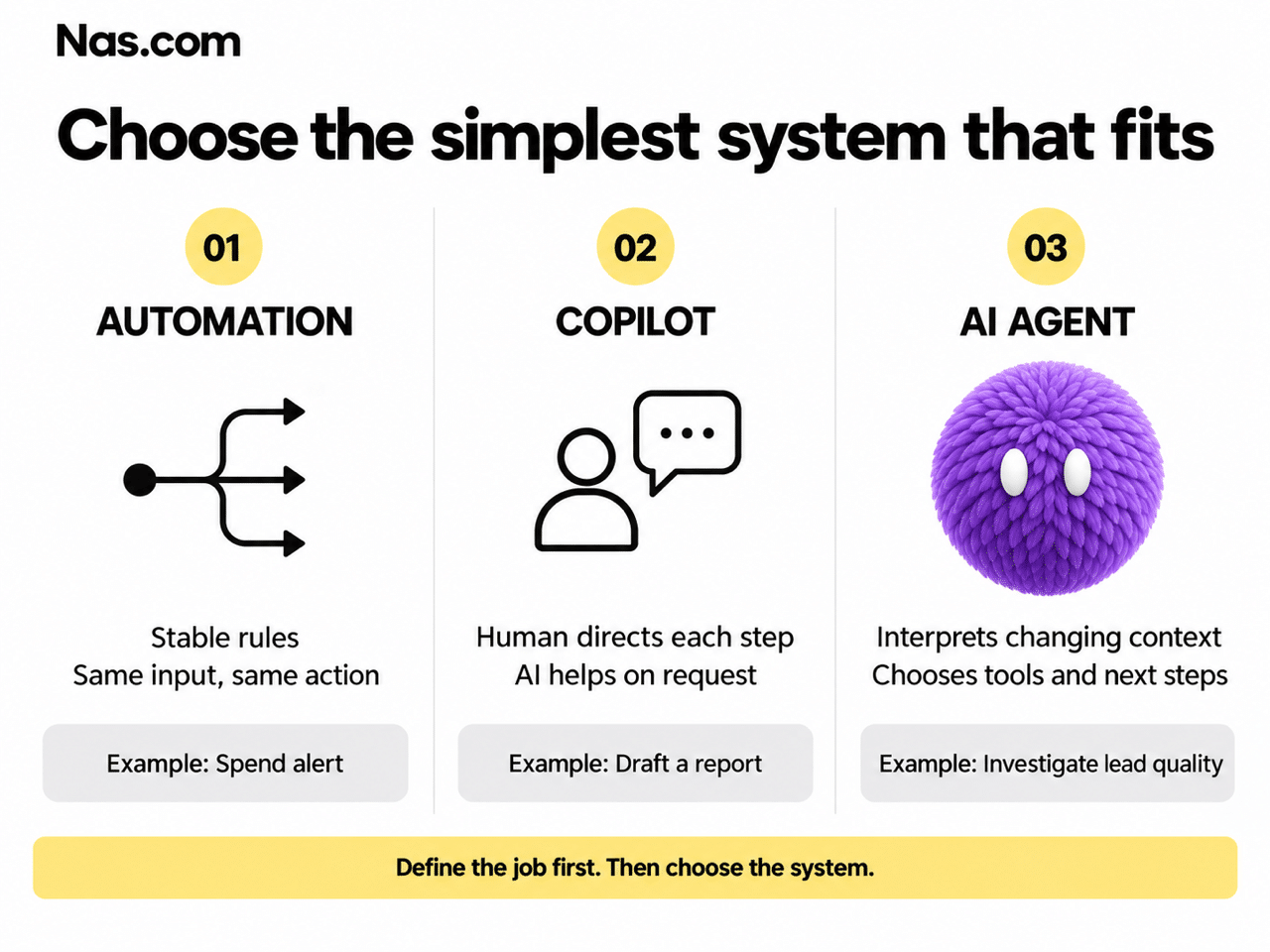
Not all AI agent use cases need an agent in practice. Once the job is clear, choose the simplest system that can handle it reliably.
Use automation for stable rules
If the same input always leads to the same action, ordinary automation may be enough. For example, a fixed rule can notify a marketer when daily spend crosses a limit. It does not need to interpret why that happened.
Use a copilot when a person directs the work
A copilot helps someone draft, analyze or summarize on request. For instance, a marketer could ask it to prepare a weekly performance summary, then choose the next step themselves.
Use an agent when the next step depends on context
An agent can work across several steps without a person directing each one. Depending on its setup, it can also watch for a trigger and start an approved workflow.
For example, it might notice a lower cost per lead, then check the CRM. If qualified leads have also fallen, it could identify the campaigns behind that change and recommend what to inspect. The next step depends on what it finds.
OpenAI’s practical guide to building agents highlights complex decisions, hard-to-maintain rules and unstructured information as promising areas. Therefore, choose an agent when interpretation adds value to the workflow.
Five signs of strong AI agent use cases
Several jobs may need an agent. To choose where to begin, look for these five qualities.
1. The work happens often enough to matter
Recurring work gives the team repeated value and enough examples to judge performance. A daily 20-minute pacing check, for example, also interrupts a marketer’s other work.
The trigger does not have to be a schedule. New leads, negative reviews and changes in campaign performance can also start a recurring workflow.
2. The agent can access reliable information
An agent needs data it can reach and trust. Suppose you want to improve lead quality from Meta campaigns. Ad data shows spend, clicks and submissions. However, you need reliable CRM records to know which leads became sales opportunities.
Before building, check:
- Where does each required input live?
- Is there one accepted source for each important metric?
- Is the information current enough for the decision?
- Can the agent access it with suitable permissions?
- Are key rules documented, or only in someone’s head?
If the CRM is weeks out of date, fix that first. Otherwise, the agent will make faster recommendations from poor information.
3. The team can explain a good decision
“Improve performance” gives an agent too little direction. Instead, an experienced marketer should explain which evidence matters and when a person should step in.
For paid media, that includes how much data a creative needs before review. It also includes when to wait, why cheaper leads can be worse, and which changes need approval.
Turn that judgment into instructions, examples and limits. Then check whether the agent applies them correctly. If experts cannot explain good work, they will struggle to evaluate the result.
4. The output leads to a useful action
Strong AI agent use cases end with something the business can use. The agent might flag a campaign, recommend a budget change, update a record or draft a response for approval.
However, every action needs an owner. A daily list of problems has little value if nobody is responsible for reviewing it.
5. The team can measure success
Define success before building. For example, judge a reporting agent by preparation time, errors and timely delivery, rather than the number of reports it creates.
Similarly, a lead agent should produce prospects the team accepts and qualified pipeline. A larger contact list alone does not show business value.
If the team cannot agree on a useful result, clarify the goal before starting AI agent implementation.
Check what could go wrong before giving access
A valuable workflow can still be a poor first choice if mistakes are hard to reverse. Therefore, assess risk separately from potential savings.
- Who is affected? An internal analyst, a customer or the public?
- What can change? A draft, CRM record, ad budget or public message?
- Can you reverse it? Fixing an internal summary is easier than recovering lost spend.
- When will someone notice? Review tomorrow creates different exposure from a mistake that runs for weeks.
You can often reduce risk by limiting authority. For example, an agent can draft a response to a serious complaint while a person controls publishing. It can also recommend a large budget change without making it.
The NIST AI Risk Management Framework offers a broader approach to identifying and managing AI risks. For a first marketing workflow, define human review and escalation before the agent starts work.
Use a scorecard to compare AI agent use cases
Review your shortlist with the person doing the work, the business owner and the data owner. Then score each candidate from 1 to 5 against the same criteria.
Use this AI use case prioritization framework to make tradeoffs visible. A score of 1 signals a weak area; 5 signals a strong one. For safety, a higher score means mistakes are easier to detect and correct.
Add the scores to compare candidates, but do not treat the total as a final decision. For example, high business value cannot compensate for data the agent cannot access.
Five marketing AI agent use cases to compare
The examples below illustrate how one team might assess its options. They are starting points for discussion, not universal rankings.
Daily campaign monitoring
Why it fits: Frequent work, visible performance data and clear next steps.
Check first: Can you connect CRM outcomes to campaign data?
Start with: Flag unusual spend or performance changes and recommend what to inspect.
Weekly performance brief
Why it fits: A repeated process with a clear audience and output.
Check first: Do teams agree on metrics and sources? A simple draft may only need a copilot.
Start with: Prepare one brief with links to the underlying data.
Lead qualification
Why it fits: Strong business value and a clear sales handoff.
Check first: Are qualification rules and CRM records reliable?
Start with: Recommend prospects for review before outreach.
Brand positioning research
Why it fits: Research and synthesis can support the team.
Check first: Final choices rely on taste, strategy and company context.
Start with: Gather evidence and develop options for a human decision.
Crisis communication support
Why it fits: Fast fact gathering may help a team respond.
Check first: An incorrect public response can damage trust.
Start with: Assemble context and drafts. Keep approval and publishing with a person.
Campaign monitoring may be a stronger first choice than brand positioning because its results are easier to observe. Our guide to what a Meta Ads AI agent can automate explores that workflow further.
Lead qualification can also work well, provided sales agrees on the criteria. Otherwise, align the process before adding an agent.
Define a first version the team can test
Once you choose a candidate, narrow its first responsibility. For example, “monitor our Meta campaigns” could include rejected ads, broken forms, pacing, creative fatigue and lead quality.
A more focused first version would be:
The same approach applies to other AI agent use cases. For lead qualification, begin with one approved source and show evidence of fit. For review monitoring, begin with one platform and prepare responses for approval.
Next, document six parts of the pilot:
- The event or schedule that starts the work.
- The approved information the agent can use.
- The decision it needs to make.
- The output or action it can produce.
- The person responsible for reviewing it.
- The business result the team will measure.
If any part is unclear, narrow the job again. A focused pilot makes it easier to see what needs fixing.
Measure the whole workflow, including human review
Before the test, record how the team does the work today. Without this baseline, you may see more activity without knowing whether the process improved.
Depending on the job, track:
- Time spent doing and reviewing the work.
- Accuracy and the types of errors found.
- Time from trigger to completed result.
- Recommendations accepted, changed or rejected.
- Impact on the relevant business outcome.
- Exceptions reaching the right person on time.
For example, a two-minute report is not faster overall if a manager spends an hour correcting it. Include that review time when measuring savings.
Also agree on reasons to stop or redesign the pilot. These might include repeated use of incorrect data, missed exceptions or review time that remains too high.
Give the agent more authority gradually
The first version does not need full autonomy. Instead, expand one action at a time as the team gains evidence that the agent is reliable.
1. Recommend
The agent analyzes the situation and suggests an action. A person checks every result before anything changes.
2. Act after approval
Next, the agent prepares the action and carries it out only after a person approves it.
3. Act within agreed limits
After successful tests, the agent can handle specific low-risk actions within clear limits. It sends exceptions to a person.
For a Meta ads workflow, this might mean moving from budget recommendations to small approved adjustments. However, larger changes can remain under human control.
Remove permissions if the data, workflow or performance changes. An agent with a recurring responsibility may become part of a wider AI employee setup, but it still needs a human owner.
Use the first project to make the next agent easier
Choosing AI agent use cases also shapes how your company learns to delegate. Start where an experienced person can review decisions and explain disagreements.
Some disagreements will expose agent errors. Others will reveal unclear rules, missing data or inconsistent expectations. Either way, use those findings to improve the workflow.
Once the narrow test works, add one responsibility at a time. Avoid turning early success into a vague department-wide brief.
The first project should produce more than a working agent. It should give your team a repeatable way to choose work, supervise results and expand trust.
Frequently asked questions
What are AI agent use cases?
AI agent use cases are specific workflows in which an agent gathers information, makes decisions and uses tools to produce an outcome. For example, reviewing active campaigns each morning and recommending which need attention is a use case. “Marketing” is too broad.
What makes a good first AI agent use case?
Look for recurring work, reliable data, clear decisions, a useful next action and a measurable result. Also make sure mistakes are easy to spot and correct. A named person should own review and exceptions.
When should you use automation instead of an AI agent?
Use ordinary automation when stable rules reliably map inputs to actions. By contrast, an agent is useful when the next step requires interpretation, tool selection or judgment across changing information.
Should the first use case always be low-risk?
The agent’s first action should be easy to supervise. However, a high-risk workflow can still benefit from research or recommendations while a person controls the consequential action.
How should a business measure an AI agent?
Measure the workflow’s outcome, including human review. For example, track net time saved, accuracy, accepted recommendations, qualified pipeline or response time. More output alone does not prove better results.
Does a small business need a large amount of data?
Not always. It needs enough reliable information for the specific decision. Therefore, a narrow workflow using a few trusted sources can be more practical than a large project built on incomplete data.